第19章:遷移の結果を整える(成功/失敗)✅❌
この章は「無効な遷移が起きたとき、どう返す?」を“事故らない形”に整える回だよ〜😊✨ 状態機械って、失敗が起きるのは普通なんだよね(ユーザーが押しちゃう・連打しちゃう・順番を間違える…あるある😂)
1) この章でできるようになること🎯✨
- 「遷移できた/できない」を例外(throw)に頼らず扱えるようになる🙆♀️
- 失敗時に「理由コード+メッセージ(またはキー)」を返せるようになる🧾
- UI/API/ログ/テストに渡しやすい「遷移結果モデル」を作れる📦
2) まず結論:例外は“想定外”、Resultは“想定内”💡
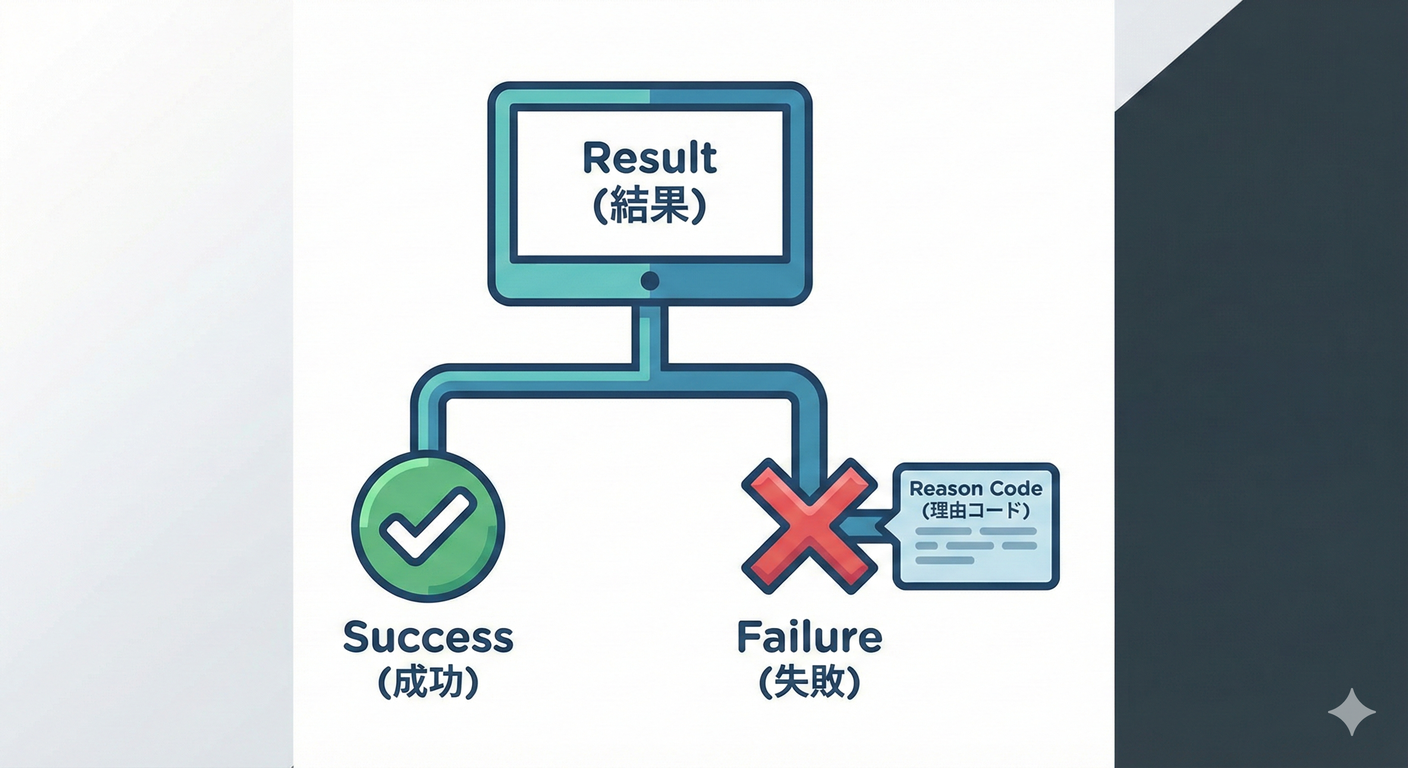
状態機械の「この状態ではそのイベント無理〜」は、だいたい 想定内の失敗 だよね?🙂 その場合、.NET の設計ガイドでも「通常の制御フローに例外を使わないでね」って言ってるよ。(Microsoft Learn)
なのでこの教材のおすすめはこう👇
- ✅ 想定内の失敗(無効遷移・ガードNG) →
Resultで返す - 💥 想定外(不変条件が壊れてる・データ破損) → 例外(=バグの匂い)
3) 「失敗」って実は種類がある🗂️✨
最低限、次の2つを分けるだけで一気に扱いやすくなるよ😊
A. 無効遷移(Invalid Transition)🚫
「今の状態では、そのイベントはできません」
例:Cooking なのに Pay しようとした、みたいなやつ🍳💳❌
B. ガード条件NG(Guard Rejected)🛡️
「イベント自体は候補にあるけど、条件が満たされてない」
例:Cancel は「調理開始前のみOK」なのに、開始後だった…みたいなやつ😢
(余裕が出たら、並行実行の衝突 Conflict とか、入力不正 Validation とかも足せるよ。これは後半章に効いてくる🧠✨)
4) “落としどころ”の設計:TransitionResult を作ろう📦✨
“成功か失敗か+必要な情報” を持った型を1つ用意するのがおすすめだよ😊
4-1. 失敗理由コード(まずはこれ!)🧾
public enum TransitionFailureCode
{
    InvalidTransition, // その状態ではそのイベントはできない
    GuardRejected,     // 条件(ガード)が満たされない
    InvariantBroken,   // 本来起きない(バグ/データ破損の匂い)
    Conflict           // 並行実行などで衝突(後の章で活躍)
}
4-2. 遷移結果(Success/Failure を1つにまとめる)✅❌
初心者さんに優しい形でいくね(読みやすさ優先)😊
public readonly record struct TransitionResult
{
    public bool IsSuccess { get; }
    public string EventName { get; }
    public OrderState CurrentState { get; }   // 遷移後(失敗なら変わらない)
    public OrderState? FromState { get; }     // 成功時だけ
    public OrderState? ToState { get; }       // 成功時だけ

    public TransitionFailureCode? FailureCode { get; } // 失敗時だけ
    public string? FailureMessageKey { get; }          // UI向けは次章で磨く✨
    public string? Detail { get; }                     // ログ/デバッグ向け

    private TransitionResult(
        bool isSuccess,
        string eventName,
        OrderState currentState,
        OrderState? fromState,
        OrderState? toState,
        TransitionFailureCode? failureCode,
        string? failureMessageKey,
        string? detail)
    {
        IsSuccess = isSuccess;
        EventName = eventName;
        CurrentState = currentState;
        FromState = fromState;
        ToState = toState;
        FailureCode = failureCode;
        FailureMessageKey = failureMessageKey;
        Detail = detail;
    }

    public static TransitionResult Success(string eventName, OrderState from, OrderState to)
        => new(true, eventName, to, from, to, null, null, null);

    public static TransitionResult Fail(
        string eventName,
        OrderState current,
        TransitionFailureCode code,
        string messageKey,
        string? detail = null)
        => new(false, eventName, current, null, null, code, messageKey, detail);
}
ポイントはこれ👇✨
- 失敗しても例外で落ちない(UI/APIが扱いやすい)
- 失敗時に
FailureCodeとFailureMessageKeyを持てる(次章に繋がる) Detailを入れておくとログが強くなる(第21章で神になる)📜💎
5) 実装:テーブル駆動+Resultで返す(ミニ版)📚🔁
ここでは「遷移表→辞書」の形を保ったまま、返り値だけ整えるよ😊
public enum OrderState
{
    Draft,
    Submitted,
    Paid,
    Cooking,
    Ready,
    PickedUp,
    Cancelled,
    Refunded
}

public interface IOrderEvent { }

public sealed record SubmitCommand() : IOrderEvent;
public sealed record PayCommand(decimal Amount) : IOrderEvent;
public sealed record CancelCommand() : IOrderEvent;
遷移ルール(ガード付き)を定義:
public sealed record TransitionRule(
    OrderState To,
    Func<Order, IOrderEvent, bool>? Guard = null,
    string? GuardFailMessageKey = null);

public sealed class Order
{
    public OrderState State { get; private set; } = OrderState.Draft;

    private readonly Dictionary<(OrderState State, Type EventType), TransitionRule> _table;

    public Order()
    {
        _table = new()
        {
            [(OrderState.Draft, typeof(SubmitCommand))] = new(OrderState.Submitted),

            [(OrderState.Submitted, typeof(PayCommand))] = new(
                To: OrderState.Paid,
                Guard: (o, e) => ((PayCommand)e).Amount > 0,
                GuardFailMessageKey: "pay.amount.must_be_positive"),
            [(OrderState.Submitted, typeof(CancelCommand))] = new(OrderState.Cancelled),
        };
    }

    public TransitionResult TryFire(IOrderEvent ev)

        var key = (State, ev.GetType());
        var eventName = ev.GetType().Name;

        if (!_table.TryGetValue(key, out var rule))
        {
            return TransitionResult.Fail(
                eventName,
                current: State,
                code: TransitionFailureCode.InvalidTransition,
                messageKey: "transition.not_allowed",
                detail: $"State={State}, Event={eventName}");
        }

        if (rule.Guard is not null && !rule.Guard(this, ev))
        {
            return TransitionResult.Fail(
                eventName,
                current: State,
                code: TransitionFailureCode.GuardRejected,
                messageKey: rule.GuardFailMessageKey ?? "transition.guard_rejected",
                detail: $"State={State}, Event={eventName}");
        }

        var from = State;
        State = rule.To;

        return TransitionResult.Success(eventName, from, State);
    }
}
これで、呼び出し側はこう書けるよ👇
var order = new Order();

var r1 = order.TryFire(new PayCommand(100)); // Draft で Pay は無効
Console.WriteLine($"{r1.IsSuccess} / {r1.FailureCode} / {r1.FailureMessageKey}");

var r2 = order.TryFire(new SubmitCommand());
Console.WriteLine($"{r2.IsSuccess} {r2.FromState}->{r2.ToState}");

var r3 = order.TryFire(new PayCommand(0)); // ガードNG
Console.WriteLine($"{r3.IsSuccess} / {r3.FailureCode} / {r3.FailureMessageKey}");
6) よくある設計のつまずきポイント😵💫➡️😊
つまずき①:失敗メッセージをドメインに直書きしがち💬
ここでは キー(例:transition.not_allowed) を返すのが安全✨
日本語の文言は第20章で“UI/API向けに整える”のがキレイだよ😊
つまずき②:例外で全部やりたくなる💥
「失敗が普通に起きうる」なら Result が楽だよ。 .NET のガイドラインもその方向を推してるよ。(Microsoft Learn)
つまずき③:失敗理由が “ただの文字列” になる🧵
FailureCode を enum にするだけで、
- テストが書きやすい🧪
- ログ分析がしやすい📜
- UI側の分岐が安全になる🧠 …って一気に嬉しくなるよ✨
7) 演習(手を動かすやつ)🎮✨
演習A:失敗理由コードを増やしてみよう🧾
TransitionFailureCode に次を追加して、返すところまでやってみてね👇
AlreadyDone(同じ操作をもう一回:冪等の入口🔁)Expired(期限切れ:第27章に繋がる⏰)
演習B:禁止遷移ベスト10に「FailureMessageKey」を割り当てる🔟
例:
transition.not_allowedcancel.not_before_cookingpay.amount.must_be_positive
演習C:Resultだけでテストを書いてみよう🧪
- 無効遷移 →
InvalidTransitionが返る - ガードNG →
GuardRejectedが返る - 成功 →
FromState/ToStateが入る
8) AIの使いどころ🤖✨(コピペで使える指示)
- 「この
TransitionResultを、呼び出し側が if 文少なく読める形に整えて」 - 「失敗理由コードの候補を、状態機械の運用で困りがちな順に10個出して」
- 「遷移表から “InvalidTransition になるケース” を自動列挙して、テストケース案にして」
- 「
FailureMessageKeyを i18n しやすい命名規則にして(例:order.cancel.not_allowedみたいな)」
※出てきたコードは、そのまま採用せず「命名の一貫性」と「責務(ドメインが文章を持ちすぎてないか)」だけチェックしてね😊🔎
9) 章のミニまとめ📌💖
- 状態機械の失敗は“普通に起きる” → Resultで返すのが扱いやすい✅
- 返すのは「成功/失敗」だけじゃなくて、理由コード+キーが大事🧾
- これが次の章(メッセージ設計)と、その次(ログ設計)で効いてくる📜✨
次の第20章では、この FailureMessageKey を「ユーザーに優しい文」に変換する設計をやるよ〜🫶💬✨